Getting a tax refund isn't technically "free money," but it's always nice to get some of your money back after a trip abroad, especially when you’ve already spent a fortune on hotels, food, and shopping. GCash is now making it easier to claim yours with its new in-app Digital Tax Refund feature.
The process is pretty straightforward: the feature lets you receive your Value-Added Tax (VAT) and Goods and Services Tax (GST) refunds straight to your GCash wallet, already converted to Philippine Pesos, with no extra fees.
Historically, getting your tax refund at foreign airports can be a bit of a headache. It usually means choosing between two annoying options: long queues for leftover foreign cash you no longer need or waiting weeks for a credit card adjustment. This third option from GCash makes tax-free shopping in places like France, Italy, Germany, and Switzerland a little more convenient. You can find the full list of supported countries at the end of this article.
How To Claim Your Travel Tax Refunds Via GCash
Even though it's faster and more convenient, the process of getting your refunds on GCash isn’t too different from the traditional methods. You'll also need to be a Filipino citizen with a fully verified GCash account to use the feature.
Here's how to cash in your refunds before boarding your flight home.
Prepare Your Documents And Items
To avoid scrambling for the necessary paperwork at the counter, gather the important documents before you leave for the airport.
You’ll be required to present your passport, flight ticket, physical tax-free refund form, shopping receipts, and unused purchased items for validation.
Get Validated By Customs
Head to the airport's tax refund or customs counter before your flight back home. Hand over your documents and wait while they verify your purchases and confirm your eligible refund amount.
Generate Your Tax Refund QR Code At The GCash App
Once the agent confirms your refund, open your GCash e-wallet. If Location Tagging is turned ON, you can tap Tax Refund straight from your GCash dashboard. If Location Tagging is turned off, go to View All, then Tax Refund. This opens the Instant Tax Refund with Alipay+ page, where you can tap Get Started to select the country you are in manually.
Tap Show Code to display your personal Tax Refund QR Code on your screen.
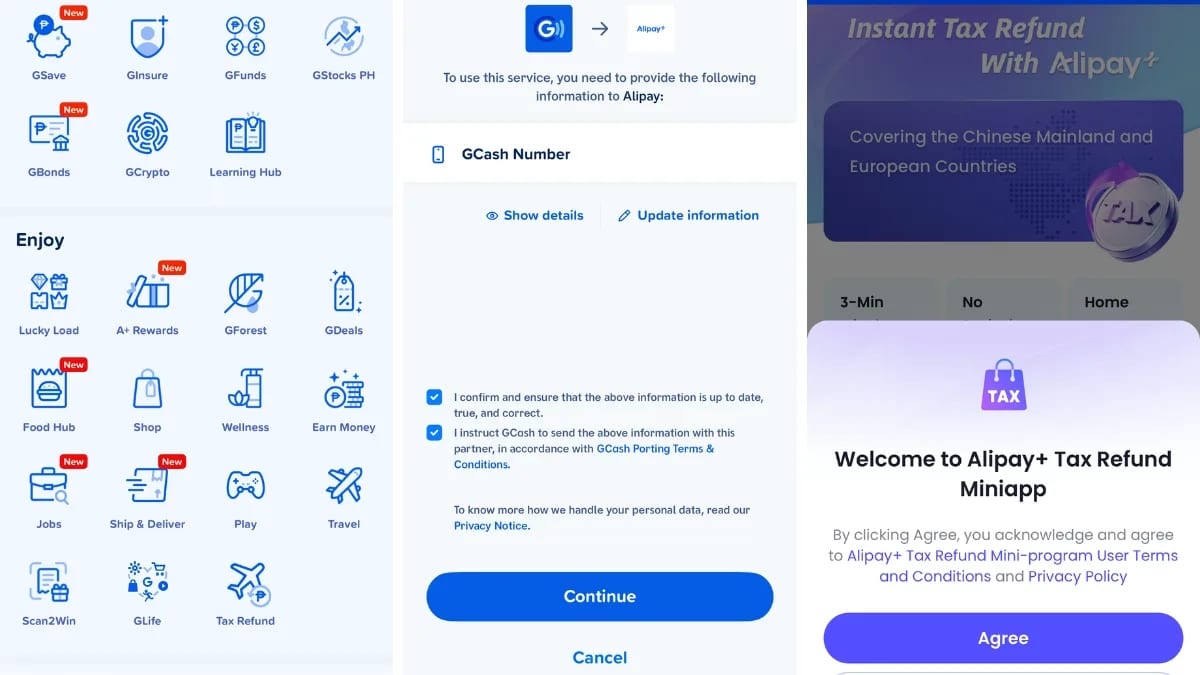
Scan To Collect Your Money
Show the QR code to the counter agent. Once scanned, your refund will be credited instantly to your GCash wallet in Philippine Pesos (PHP) with no extra fees. It will also come with an in-app confirmation notification and appear in your Transaction History.
Which Countries Support Direct Tax Refunds In GCash?
The GCash Digital Tax Refund is now available across major international airports and tax counters in the following 16 countries:
Amsterdam, Netherlands
Munich, Germany
Malpensa, Italy
Rome, Italy
Argentina
Austria
Denmark
Estonia
Finland
France
Greece
Kingdom of Saudi Arabia
Latvia
Norway
Portugal
Sweden
Switzerland

This article originally appeared on Spot.ph. Minor edits have been made by the Cosmo.ph editors.
PSA, Furparents: Your Cat Can Finally Join You On Your Next Domestic Flight
Cats are joining dogs for the ride!
CONTINUE READING
Celia Nachura writes to pay for plane tickets, tennis classes, and a pile of books she’ll never have the time to read. She is also the emotional support human to two dogs, Daisy and Nacho.